
Death & Item Recovery
From CatCraft Wiki
Contents
Summary
Dying on CatCraft works like vanilla Minecraft. You drop your items and some of your experience where you died. This page explains how to get back to your items and how they are protected.
Where you respawn
When you die, you respawn at your bed or your first home. If you have neither, you respawn at spawn. See the Getting Started guide for how to set a home.
Getting back to your items
- About 10 seconds after you die, a reminder appears on screen. Type /back to teleport to the place you last died.
- Your death location is saved for 30 days.
- /back works for deaths in the main Overworld, the Resource world, the Nether, the End and the PvP world.
Death drop protection
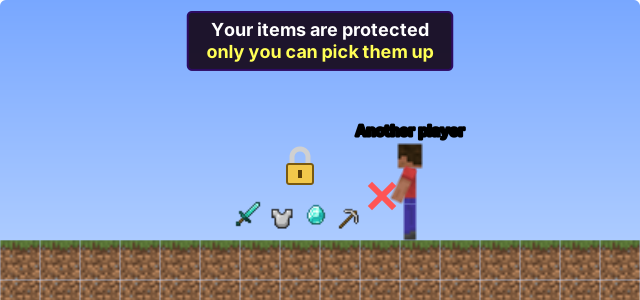
- The items you drop when you die are protected, so only you can pick them up. They stay protected even if you log off.
- To let a friend collect your items for you, type /deathtrust [player]. Use /deathuntrust [player] to remove them, and /deathtrustlist to see who you have trusted.
- To let anyone pick up the items from your last death, type /unlockdrops.
- 30 seconds after you die, your dropped items start glowing so they are easier to find.
- If you are killed with a mace’s Wind Burst, the scattered items are pulled back to where you died.
- If you die inside a claim you are banned from, your items are moved out of the claim. Type /back to go to them.
Protection does not stop items from despawning, so get back to them as soon as you can.
Item despawn times
Items on the ground normally disappear after 5 minutes. On CatCraft, many common items disappear much faster, and valuable items last longer.
| Item | Despawns after |
|---|---|
| Blaze rods, cactus, eggs | 15 seconds |
| Stone, cobbled deepslate, rotten flesh, bones, string, arrows, ender pearls, totems of undying | 30 seconds |
| Cobblestone, dirt, sand, gravel, netherrack, leaves | 100 seconds |
| Iron and stone tools, iron armour, coal, raw iron, raw gold, wheat | 2 minutes |
| Diamonds, diamond blocks, netherite, ancient debris, shulker boxes, elytras, tridents, spawners | 15 minutes |
Totems of undying only last 30 seconds on the ground, so don’t drop them.
Items you keep when you die
Many custom items are kept when you die, including the CatGod items and items such as the  Rainbow Bow and
  Angel Wings. An item’s page in the item catalogue says “Kept on death” if you keep it.
Protection from accidents
- /trash won’t accept valuable items, such as netherite gear, diamonds, shulker boxes, elytras, tridents, spawners and maces. They are given back to you.
- Items with a custom model (most custom and crate items) need to be dropped twice before they leave your inventory. Drop the item, then drop it again within 5 seconds. Type /toggledrops to turn this on or off for yourself.