
Claims
From CatCraft Wiki
Contents
- Summary
- How to claim land
- Your first chest claims land for you
- Checking claims
- Claim blocks
- Resizing and extending claims
- Subclaims
- Creating subdivisions
- Trust and permissions
- Public claim permissions
- Banning players from claims
- Where you can claim
- Protections in claims
- Removing and expiring claims
- Asking for a claim to be removed
- Keeping the world fresh
- Other claim commands
Summary
Claiming your land is the best way to keep your base safe from unwanted visitors. A claim is a square region of land that protects everything inside it. Nobody else can build, break, open containers, hurt animals, slay mobs or use anything inside it unless you trust them. This page covers everything about claims, including how to make, resize and subdivide them, who you can trust, and the rules for claims.
How to claim land
Type /kit claim to get a golden shovel and a stick. The shovel makes claims, and the stick checks them.
- Hold the golden shovel in your main hand and right-click the ground where you want the first corner of your claim.
- Keep holding the shovel, walk to the opposite corner and right-click the ground again.
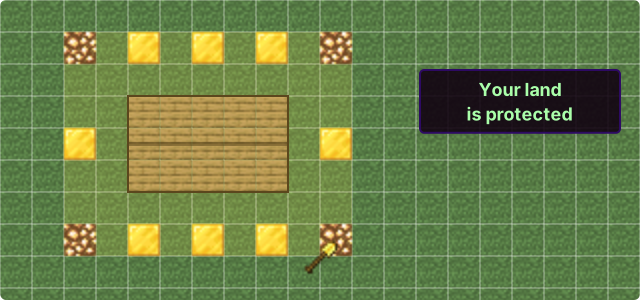
You can also claim land by typing /claim [blocks]. The number you type is the distance in blocks from where you stand to the edge of the new claim.
Your first chest claims land for you
If you don’t have a claim yet, placing a chest claims the land around it for you. The new claim is 9 by 9 blocks with the chest in the middle, reaches from 64 blocks below the chest all the way up to the sky, and uses 81 of your claim blocks. Gold blocks and glowstone briefly show its border.
- Only your first claim. It happens when you have no claims at all, in a world where you can claim. Once you have a claim, chests don’t make new ones.
- Close to someone else. If another claim is in the way, your new claim is made smaller so it fits, down to just the chest.
- Make it bigger. It’s a normal claim, so you can resize it with the golden shovel or /extendclaim whenever you like.
- Unprotected chests. If you place a chest outside a claim after that, you’ll get a reminder that it isn’t protected.
Checking claims
Right-click a block or distant land with the stick to see whether it has been claimed. Gold blocks and glowstone show the claim’s border, and iron blocks and wool briefly show any subclaims.
Sneak and right-click with the stick to see all nearby claims.
Claim blocks
- Every player starts with 1,000 claim blocks.
- You earn 200 claim blocks for every hour you actively play on CatCraft, up to a soft limit of 80,000 blocks from playing.
- Bonus claim blocks can be found in vote crates and cat crates, and bought from the server web store at https://store.catcraft.net
- A claim must be at least 5 blocks wide and cover at least 100 blocks of area.
- If you abandon a claim with /abandonclaim (or /unclaim), you get all of its claim blocks back.
- Use /claimslist to see your claims and how many claim blocks you have left.
Resizing and extending claims
- To resize a claim, right-click one of its corners (the gold blocks) with the golden shovel, then right-click where you want the new corner.
- To extend a claim, type /extendclaim [blocks]. This extends the claim you’re standing in towards the direction you’re facing.
- Claims grow downwards on their own. When you place a block at or below the bottom of your claim, the claim extends to 64 blocks below that block, so mines and builds under your base stay protected without you doing anything.
Subclaims
Subdividing lets you split a large claim into smaller plots. This is useful when you want other players to build on part of your land without giving them access to all of it.
For example, if you run a town, you can give each town member their own plot. They can build inside their plot but can’t change anything outside it.
- Subclaims do not use additional claim blocks.
- Subclaims are marked out with iron blocks and wool.
- Only the main claim’s owner can create subdivisions.
- Trust from your main claim carries over to its subclaims, so anyone you trust in the main claim is also trusted in the subclaims. You can give extra permissions in a subclaim on top of these.
- To set specific permissions for a subclaim, use /RestrictSubclaim while standing in it. This stops the subclaim from inheriting permissions from the main claim.
Creating subdivisions
- Hold your golden shovel and type /subdivideclaim to enter subdivision mode.
- Right-click one corner of the area you want to subdivide, then right-click the opposite corner, the same way you make a claim.
- The edges of the new subclaim are outlined with iron blocks and wool. To leave subdivision mode, type /basicclaims.
Trust and permissions
| Command | What the player can do in your claim |
|---|---|
| /accesstrust [player] | Use buttons, levers, doors and beds, read lecterns and set homes. |
| /containertrust [player] | Everything above, plus open containers, use crafting stations, trade with villagers and interact with animals. |
| /trust [player] | Everything above, plus build and break blocks. |
| /permissiontrust [player] | Lets the player give and remove trust in your claim. |
| /untrust [player] | Remove a player’s trust. |
| /trustlist | See who is trusted in the claim you are standing in. |
A few things to know about trust.
- To set a /sethome inside someone else’s claim, you need at least access trust there.
- Throwing an ender pearl into someone else’s claim needs access trust.
- Copper golems can only be brought into a claim by a player with build trust (/trust).
Public claim permissions
To give everyone a permission, use public in place of the player name. For example, /accesstrust public lets everyone use your buttons, levers and beds, but not your containers or animals, and they can’t build.
Be careful with this, as it gives every player that permission. Use /trustlist to check the claim’s current permissions.
Banning players from claims
To stop a player from entering your claims, type /banfromclaim [player].
Where you can claim
You can claim land in the main Overworld, the Resource world, the Nether and the End. Claims can’t be made in the Market, the PvP world or at spawn.
Remember that the Resource world, the Nether and the End are reset from time to time, and your claims there are removed when they reset. Build anything you want to keep in the main Overworld.
Protections in claims
- Fire doesn’t spread or burn blocks, anywhere on the server.
- Endermen can’t pick up blocks, and silverfish can’t break blocks.
- Mobs can’t trample crops.
- Explosions don’t break blocks inside claims, and creeper and other explosions don’t break blocks above sea level.
- Animals and pets inside your claim can’t be hurt by players you haven’t trusted.
- Items you drop when you die are protected for you. See Death & Item Recovery.
Note that ravagers in a raid can still break blocks, and rabbits can still eat crops.
Removing and expiring claims
- To delete a claim, type /unclaim while standing inside it. To delete all of your claims at once, use /abandonallclaims.
- If you stop playing, your claims are removed after 90 days offline, unless you have 3,400 or more claim blocks in total (about 12 hours of play, or fewer if you have bonus blocks).
- If your only claim is the automatic one from your first chest (see Your first chest claims land for you) and you stop playing, it’s removed after 7 days offline.
Asking for a claim to be removed
Builds on CatCraft are kept for years, so claims are usually not removed. If a claim near you looks abandoned, or someone claimed too close to your build without asking, you can ask staff to review it.
- Stand inside the claim and type /claimremoval in game. If you’re not inside it, the server asks you to left-click a block inside the claim within 30 seconds.
- Choose a reason, either Abandoned or inactive or Claimed too close.
- Check the details and confirm to send the request.
- Abandoned or inactive. The owner must have been offline for at least 90 days, and the claim must be smaller than 3,000 blocks.
- Claimed too close. Staff may send the owner a notice first, giving them time to move their items before the claim is reviewed again.
- Limits. You can have up to 3 requests waiting at once. You can’t request your own claim, an admin claim or a subdivision.
Staff look at each request themselves and decide case by case, so a request is never a guarantee. You’ll get a message in game with the result, even if you were offline at the time. If a request is denied, the same claim can’t be requested again for 90 days. You don’t need to open a ticket or message staff about a request.
Staff are more likely to remove a claim that shows little or no progress, such as one with no builds or containers, especially a small one. A claim made in the last two weeks within 100 blocks of a build that was there long before may also be removed.
Keeping the world fresh
The main Overworld is never reset, so your builds can last for years. To keep it looking its best, on the Red and Green Realms land that is not claimed and that nobody has been near for 30 days is restored to fresh, natural terrain.
This keeps the world a nice place to build and explore.
- Tidier land. Stray blocks, pillars, holes and other leftovers in the wild are cleaned up, so the land around your base stays beautiful.
- New biomes and features. After a major Minecraft update, restored land uses the latest terrain, so new biomes, caves and structures can appear even in an old world.
- Fresh resources. Trees, ores and other resources come back in areas that were stripped bare.
Claims are never touched. Claim your builds, farms and anything else you want to keep, and claim a little more land than you need so the edges of your build are covered. Land near where players spend time is kept too.
Why not the Blue Realm? The Blue Realm’s world was created before Minecraft 1.18 changed how terrain is generated. Fresh land there wouldn’t match the older land around it and would leave odd-looking edges, so the Blue Realm keeps all of its land just as it is.
Other claim commands
| Command | What it does |
|---|---|
| /extendclaim [blocks] | Extend the claim you are standing in towards the direction you are facing. |
| /abandonallclaims | Delete all of your claims. |
| /banfromclaim [player] | Ban a player from entering your claims. |
| /trapped | Get out of someone else’s claim if you are stuck inside it. |
| /claimremoval | Ask staff to review an abandoned claim, or one made too close to yours. |