Survival
From CatCraft Wiki
Contents
- Summary
- At a glance
- Worlds
- Main Overworld
- Resource world, Nether and End
- World sizes
- Building tips
- Chunk hoppers
- What are chunk hoppers?
- How do I use a chunk hopper?
- Items it can collect
- Mobs it can auto-kill
- How can I get chunk hoppers?
- Armoured elytras
- How do I make one?
- Durability, repairs and enchantments
- Mazes
- Events
Summary
Survival on CatCraft plays like vanilla Minecraft. You gather, build, farm and explore the way you always have, with a few quality-of-life extras that save time and keep your builds safe.
You can play on Minecraft Java or Bedrock Edition (see Java & Bedrock Cross-play), on any of the three Realms, Red, Green and Blue. Each Realm has its own worlds, so pick one and start your adventure. The Getting Started guide walks you through your first day.
Watch the official CatCraft server trailer at https://www.youtube.com/watch?v=K1por4nnKcM
At a glance
Here are the extras CatCraft adds to survival. Each one links to its own page or section.
- Vein mining and tree chopping. Sneak to mine a whole ore vein at once, and chop the bottom log to fell a whole tree. See Mining.
- Land claims. Protect your base with a golden shovel so nobody else can build, break or open your chests. See Claims.
- A main Overworld that never resets. Your claimed builds stay for years, and a separate Resource world is there for gathering. See Worlds below.
- Death drop protection. Only you can pick up the items you drop when you die, and /back takes you straight to them. See Death & Item Recovery.
- Chunk hoppers. Collect crops and mob drops from a whole chunk, with an optional auto-kill. See Chunk hoppers below.
- Armoured elytras. Fuse an elytra with a chestplate so you can fly and stay protected. See Armoured elytras below.
- Mazes and minigames. Win prizes in easy, medium and hard mazes. See Mazes below and Minigames.
- Pets. Tame animals the vanilla way, or get a cosmetic pet that follows you around. See Pets.
- Voting and the piñata. Every vote gives you a crate key, and the piñata party at spawn hands out free loot. See Voting & Piñata.
- The market. Buy and sell with other players for diamonds at the market. See Market.
- Quality of life features. Send items to offline friends, trade safely, sit on stairs and more. See Quality of Life Features.
- Faster nights and optional phantoms. Nights pass at least twice as fast in both Overworlds, and phantoms are off unless you turn them on. See Quality of Life Features.
- Events all year. Seasonal events, scavenger hunts and challenges with prizes. See Events below.
Mob farms, villager trading halls and redstone work like vanilla too. A few generous limits keep every Realm smooth, and most builds never come close to them. See Farm & Entity Limits.
Worlds
Main Overworld
The main Overworld is where you build your base, your farms and anything you want to keep. It is never reset, so your claimed builds stay for years to come. It uses terrain from the latest version of Minecraft, and its border may grow over time to make room for brand-new terrain.
On the Red and Green Realms, unclaimed land that nobody has been near for 30 days is restored to fresh terrain. This tidies up leftover blocks, brings back resources and lets new biomes from Minecraft updates appear. Claims are never touched, so claim your builds to keep them. See Keeping the world fresh.
Resource world, Nether and End
The Resource world, the Nether and the End are vanilla-generated worlds, also using terrain from the latest version of Minecraft. They are reset from time to time, so they are always fresh to explore.
- Resource world. Like the Overworld, full of untouched ores and forests for gathering. It resets every two months.
- Nether. Resets every three months, with a new seed.
- End. Resets every month, so new players can find fresh End treasures.
World resets for the Resource world, the Nether and the End are announced on the Discord server and the front page of the CatCraft website. Claims in these worlds are removed when they reset, so build anything you want to keep in the main Overworld.
World sizes
Each world has a square border. The sizes are the full width of each world, in blocks.
| World | Blue Realm | Red Realm | Green Realm |
|---|---|---|---|
| Main Overworld | 58,000 x 58,000 | 45,000 x 45,000 | 50,000 x 50,000 |
| Resource world | 25,000 x 25,000 | 25,000 x 25,000 | 25,000 x 25,000 |
| Nether | 25,000 x 25,000 | 25,000 x 25,000 | 25,000 x 25,000 |
| End | 50,000 x 50,000 | 50,000 x 50,000 | 50,000 x 50,000 |
Building tips
Tips from CatCraft’s builders for making your base look its best.
- Shape your land first, plan out a foundation and picture the build in your head.
- Pick a small palette of blocks that go well together. HueBlocks makes colourful block gradients for you.
- Look for inspiration online, or in the #player-builds channel on the Discord server.
- Decorate with custom heads. Type /heads to open the heads menu.
- Work with the landscape around you, not against it.
- Find a build style that suits you.
- Claim a little more land than your build needs, so there’s room for decorations. See Claims.
Chunk hoppers
What are chunk hoppers?
A chunk hopper is a special hopper that collects crops and mob drops from the whole chunk it’s placed in. It also has an auto-kill option that farms certain mobs for you, such as zombies, skeletons and slimes. Chunk hoppers are a lag-friendly way to collect items from farms of any size.
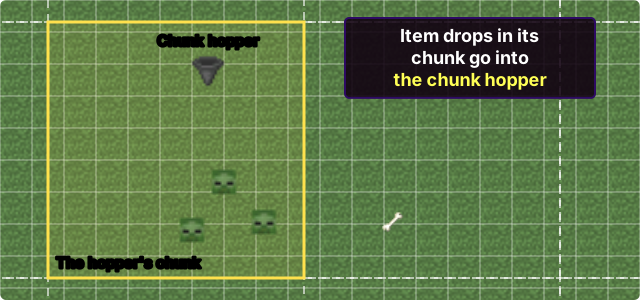
Chunk hoppers work with regular hoppers, and a simple menu lets you choose which items and mobs to collect. They collect items every 2 seconds.
How do I use a chunk hopper?
- Place the chunk hopper within one of your claims. Chunk hoppers work in the main Overworld, the Resource world, the Nether and the End.
- Right-click the chunk hopper to see the items stored inside. You can connect it to an adjacent chest or hopper to expand its storage, just like a regular hopper.
- Sneak and right-click it to open the filter menu. There you choose which items and mobs to collect, and whether to turn on auto-kill.
Keep it flowing. If auto-kill is on, it turns off by itself once the chunk hopper’s storage is full. Connect your chunk hopper to another hopper that leads to your storage system, so it never fills up and keeps culling mobs.
Items it can collect
The filter menu has a ready-made list of common farm items.
- Crops and plants. Cactus, carrots, wheat seeds, wheat, potatoes, sugar cane and apples.
- Logs. Oak, birch, spruce, jungle, dark oak and acacia logs.
- Mob drops. Rotten flesh, bones, gunpowder, string, spider eyes, ender pearls, slimeballs, blaze rods, magma cream, arrows, bows, ink sacs, prismarine shards, prismarine crystals and cod.
Any other item. You can filter any item, not just the ones in the list. Hold the item, then sneak and left-click the chunk hopper to add it. This works for things like gold nuggets, ochre, verdant and pearlescent froglights, scutes, leather, every colour of wool, honeycomb, honey bottles and glass bottles, and even grindable event items.
Mobs it can auto-kill
Auto-kill works on the mobs below. More mobs may be added as Mojang releases updates.
| Mob | Picture |
|---|---|
 Creeper Creeper |
|
 Zombie Zombie |
|
| Zombie villager | |
 Husk Husk |
|
 Skeleton Skeleton |
|
 Spider Spider |
|
 Cave spider Cave spider |
|
 Blaze Blaze |
|
 Slime Slime |
|
 Magma cube Magma cube |
|
 Chicken Chicken |
|
 Bat Bat |
|
 Drowned Drowned |
|
 Glow squid Glow squid |
|
 Guardian Guardian |
|
 Hoglin Hoglin |
|
How can I get chunk hoppers?
Chunk hoppers are available from the server store at https://store.catcraft.net
Armoured elytras
An armoured elytra is an elytra fused with a diamond or netherite chestplate, or with protection enchanted books, to make it stronger. It flies exactly like a normal elytra, but it also protects you like a chestplate, so you don’t have to choose between the two.


How do I make one?
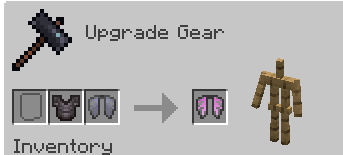
- With a chestplate. The most common way. Put an elytra and an enchanted diamond or netherite chestplate into a smithing table.
- With enchanted books. Put an elytra and protection enchanted books that would fit a normal chestplate into a smithing table, the same way.
- Upgrading to netherite. Combine a diamond armoured elytra with a netherite ingot in a smithing table to turn it into a netherite one.
You can get an  Elytra by exploring the End, or win one from the cat and vote crates.
Durability, repairs and enchantments
- An armoured elytra has the durability of its armour tier, so a diamond one has 528 durability, the same as a diamond chestplate.
- Repair it in an anvil. A full repair takes 3 diamonds for a diamond armoured elytra, or 3 netherite ingots for a netherite one. A broken armoured elytra can’t be worn until it’s repaired.
- You can add Unbreaking, Mending, Thorns and one type of Protection (Protection, Fire, Blast or Projectile Protection) in an anvil, and rename it there too.
Mazes
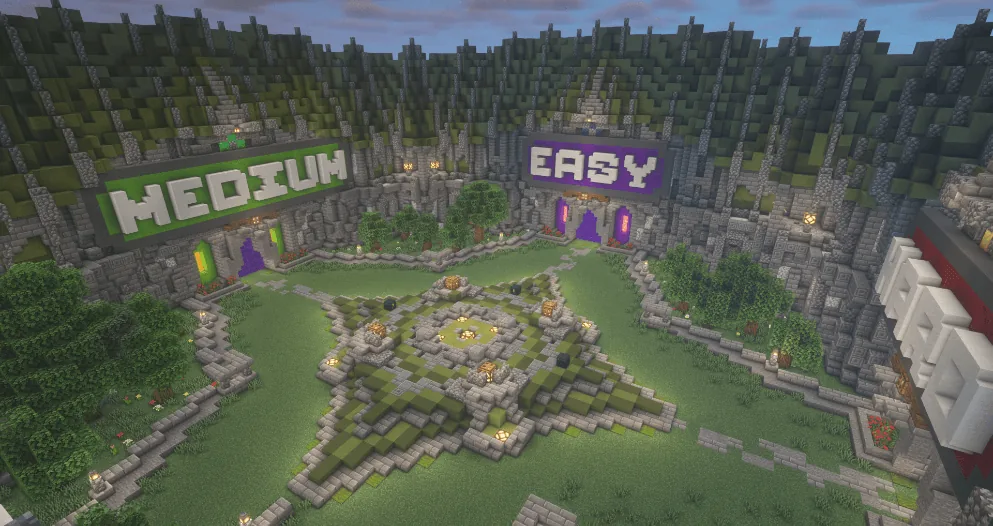
Win free prizes by completing the mazes at /games, or go straight there with /warp maze_lobby. There are three tiers of mazes, easy, medium and hard, and each has a cooldown depending on its difficulty. If you ever get stuck, type /escape to leave the maze.
See Minigames for the other games you can play.
Events
CatCraft hosts events all year round on top of survival gameplay.
- Large-scale events every three months, with giant scavenger hunts, parkour, mini mazes and puzzles.
- Seasonal events at Halloween, Easter and Xmas.
- Small challenges with prizes, all through the year.
See Events for every past event, or check out the trailer for Pirate Island 2, one of our biggest events, from 2021. You can read about it on the Pirate Island 2 page.